
Every device, anywhere.
A true MDM platform.
Provisioning, configuration, monitoring, and maintenance for every endpoint on the estate.
One console. Every endpoint.
One console for every device on the estate, whichever manufacturer built it. So the size of the estate stops deciding how long a change takes.
Architecture
Four parts. One console.
Mirillium is the operations layer of the estate, and it is not a single screen. The console carries the same name; three more parts sit alongside it, scoped by the same hierarchy and the same roles.
The screen the estate is run from, whatever the hardware vendor built the device.
Terminal activity as it happens, session by session, on a screen wide enough to watch it on.
The layer the estate is linked across. A Screen Remote session negotiates its relay over it before the first frame arrives.
Applications out to the estate, with the configuration templates and bulk operations that carry them.
Tenancy
Shaped like the business.
Every object sits at a level and inherits from the one above it. Roles are scoped along the same lines, and an audit reads across them.
The tenancy tree. Northbridge Payments is a customer; Rhea’s Enterprise is a customer nested inside it, holding two businesses (Rhea’s Burgers and Rhea’s Coffee) and beneath those, registered devices and the applications running on them. One configuration pushed at Rhea’s Enterprise reaches 2 businesses, 14 devices and 14 applications. Coastal Merchant Group, a customer at the same level, is untouched. The accounts and counts shown are invented.
The operator’s own account, and it nests. An ISO, its sub‑ISOs and their merchants are one tree rather than four.
A merchant, a brand, or a region inside one. The level most changes are made at.
A single registered device, with its own state, parameters, and location.
What runs on the device, versioned and controlled apart from the device itself.
- Act on a whole levelOne operation reaches every device under it, instead of a list assembled by hand.
- Set policy from any levelPolicies, feature sets and configuration standards travel downward from wherever you set them.
- Reach it through the APIThe same hierarchy is addressable programmatically as well as through the console.
Provisioning
Powered on. Ready to trade.
A business holds a pool of activation codes against its terminal limit. A device claims one the first time it starts, registers itself, and pulls its profile, applications and keys from the level that code belongs to. A number commissions the device, and the console remembers which device spent which code.
The activation-code pool for one business. Six codes are claimed in turn, each turning from issued to used as a terminal registers against it: a Verifone Mini, a PAX A920, a second A920, a Semiteck, a BlueCash and a Datecs CFT-50, several different makes on the same business. The codes shown are invented, not live ones.
Security
It locks itself.
Every registered device reports its state, memory, storage and battery, along with where it is standing. A terminal is assigned a location and a radius; cross it and the device locks, while the people who need to know are told. So a terminal that leaves a site stops being a payment terminal before it reaches the parking lot.
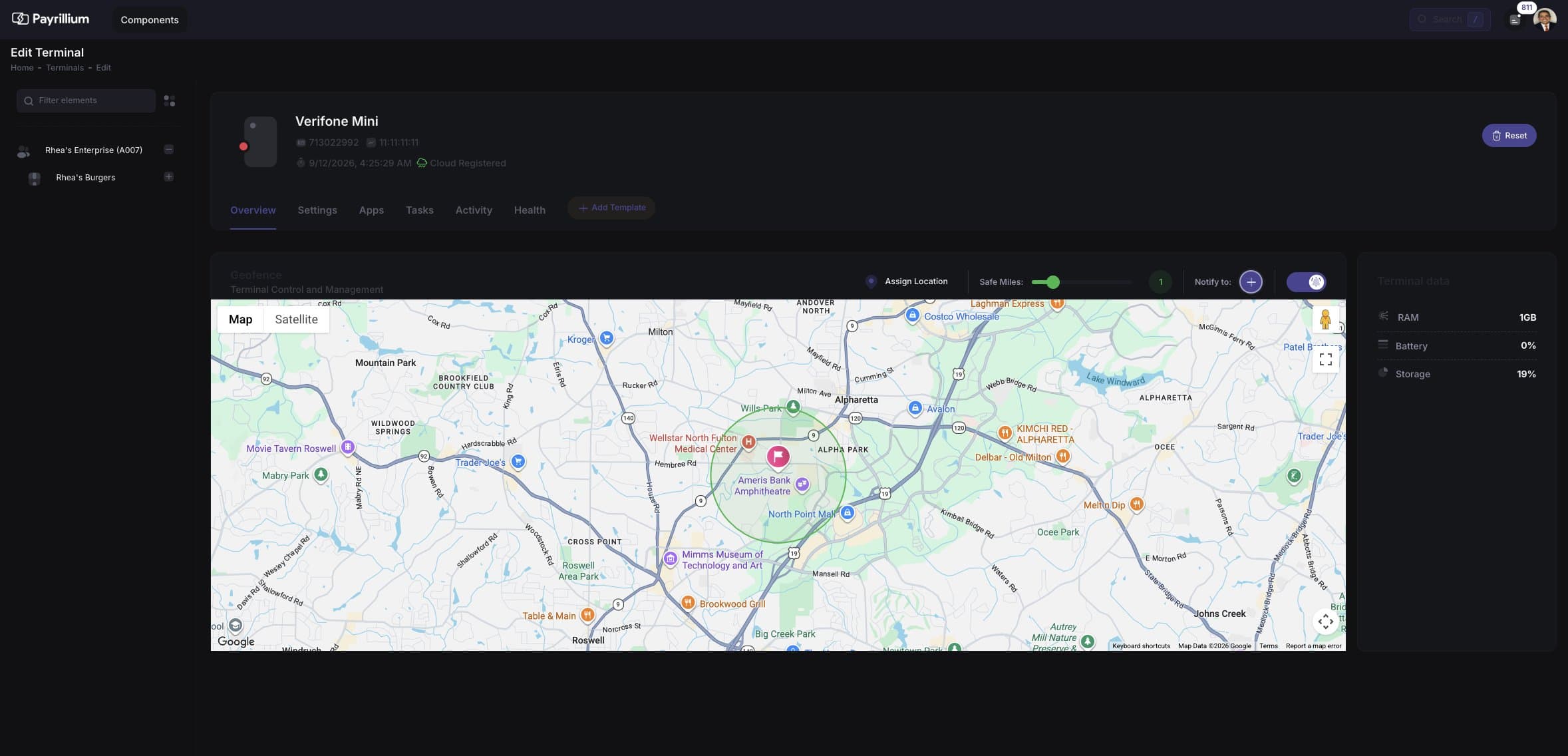
A terminal assigned a location and a safe‑mile radius, with the people who get told set beside it.
Templates
What you build is what ships.
The Template Designer is a canvas. Components go on it, the tab takes its finished shape as they land, and what sits on the canvas is what reaches the terminal. Transaction types, taxes, tips, receipts, and EMV parameters all arrive this way: published once, then synced to every device and application beneath it in the hierarchy. An option reaches the estate without an application build behind it.
The Template Designer mid‑build. The component palette is on the left, the tab takes shape in the middle, and the Input Inspector sits on the right waiting for something to be selected. Four components land in turn: a text input for the customer name, a card, a radio and a switch (each one arriving on the canvas a moment after its tile in the palette lights). Sync then carries the finished tab out. The template shown is one of the console’s own examples.
Applications
Roll it out. Or roll it back.
Install, update and remove applications from the console, at whichever level of the estate the change belongs to. Every one of those is written down. So a version proves itself on one site before it reaches the rest.
- Install
Push an application to a level, and every device beneath it receives it.
- Update
Move a version forward on a schedule, or the moment it is approved.
- Uninstall
Take an application off a device, a site, or all of them.
- Task ledger
Every install and removal, with the version, the outcome and the minute it happened, held per device.
- Marketplace
An enterprise catalogue of approved applications, scoped to each customer.
- Batch
Any of the above, run across an entire level as one operation.
Operations
Over the air. All of it.
Configuration, applications, keys, and recovery all reach the device where it already stands. Nobody drives to a site to change a setting.
Support
Drive it from here.
Screen Remote mirrors a registered device in real time, and it taps, types, and reboots from the console. So a fault is fixed while the merchant is still on the phone.
The console opening a Screen Remote session on mesh node PPYLMM01A091050. The session negotiates a Mesh relay, then connects at 1920 by 1080 and draws the device’s own screen into the window, with mouse and keyboard attached to the canvas.
Any registered device, mirrored in the control panel as it is being used.
Navigate the device as if it were in your hand, from wherever the console is open.
Power, volume, camera, keyboard and system keys, driven from the same session.
Recover a device in place, or secure it, without anyone visiting the site.
Lens
See the screen itself.
Lens mirrors a registered terminal as the operator sees it. Take a still or a recording, press the device’s own keys, ask an assistant what is on screen, or take control. What the terminal shows becomes the record.
A screen session opening against a terminal. The panel first draws a portrait device showing the Payrillium splash, then reshapes to the proportions of a Verifone Mini and mirrors its screen (a greeting on white, in a different language each pass) with power, volume, screenshot, recording, keyboard, assistant and control keys on a rail beside it, and the device’s navigation keys beneath.
MCP
Ask it. Then tell it.
Mirillium publishes itself to assistants as an MCP server, under the same permissions and the same hierarchy that govern the console. So device status, versions, tenancy and activity can be asked for in plain language, and acted on, because an operation resolves to the same API the console calls.
An assistant is asked which terminals at one business are behind on their application. It answers that three of six are, and lists them with their versions: a Verifone Mini, a PAX A920 and a Semiteck, all on 2.3.0. It is then told to bring those three up to date, and carries out the operation: a push of version 2.4.1 to three devices, scoped to that business, queued as a task. The devices, versions and task number shown are invented.
Identity
Bring your own identity.
Mirillium authenticates through OKTA or Auth0, and roles follow the same hierarchy the estate does. The permission review happens before the rollout, not after it.
Reporting
Every action, on the record.
Standard reports run by business, customer, role, and device, and export to PDF or Excel. Full audit analytics hold what changed, who changed it, and when.
Deployment
Your infrastructure. Your rules.
Mirillium runs where the operator already runs, under the operator’s own brand.
Installed in the operator’s own data centre, with the estate’s data staying inside it.
Deployed to the cloud platform the business already buys.
Turnkey branding, so the console a merchant signs into is the operator’s.
Every Android device on the estate, run from the same console.
Devices reach the console over MQTT and HTTPS.